
Download HP-42S Calculator Simulator – HP-42S calculator, scientific calculator, engineering calculator, Windows calculator, math tool, advanced math, calculator simulator, HP-42S emulator
Overview
The HP-42S Calculator Simulator is a digital recreation of the iconic HP-42S scientific calculator, designed to deliver advanced mathematical capabilities to users on the Windows platform. Originally released in 1988, the HP-42S was renowned for its robust functionality, programmability, and precision—features that continue to make it a favorite among engineers, mathematicians, and students. This simulator preserves the essence of the original device while adapting it for modern computing environments. It serves as a cost-effective alternative to purchasing a physical HP-42S, offering access to its full suite of functions without the high price tag.
The app targets professionals and students in technical fields who require reliable, high-precision calculations. It is particularly useful in academic settings, engineering design, and fieldwork where quick, accurate computations are essential. The simulator’s interface closely mirrors the original hardware, providing a familiar experience for users transitioning from physical devices. Its purpose is to streamline complex calculations, reduce manual errors, and support efficient workflow in demanding technical environments.
Developed by Jason A. Bilbrey, the app reflects a deep understanding of both historical calculator design and modern usability principles. Although the developer did not provide additional technical details, the app’s continued availability since 2019 suggests stability and ongoing user interest. In the broader app ecosystem, it occupies a niche but valuable space—bridging legacy tools with contemporary computing needs.
Key Features & Functionality
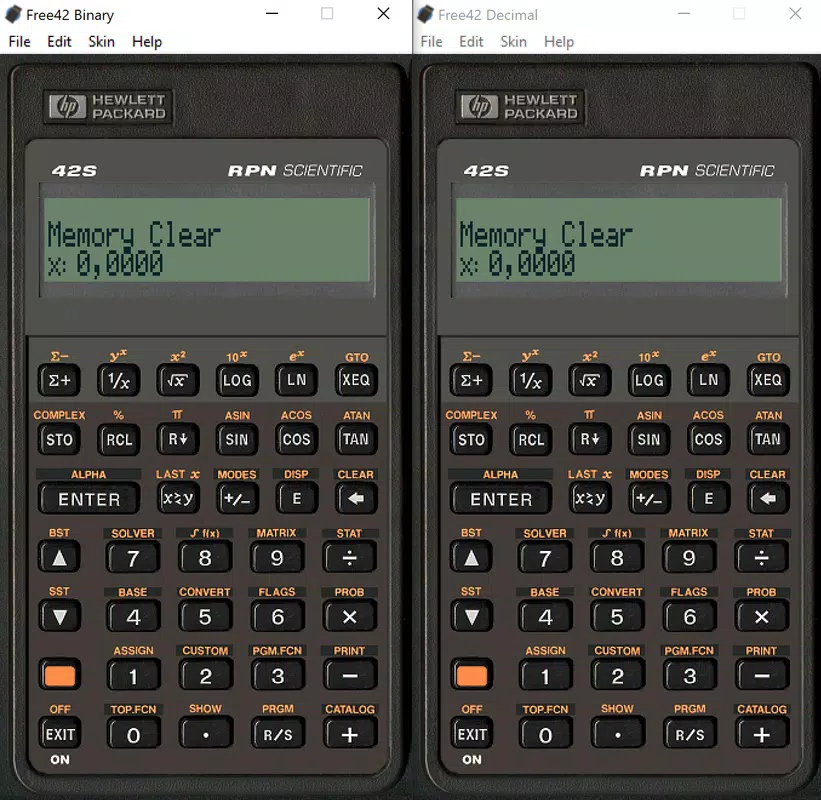
- User-Friendly Interface: The simulator replicates the original HP-42S layout with pixel-perfect accuracy, allowing users to navigate through functions using intuitive button presses. This design reduces the learning curve for those already familiar with the physical device.
- Wide Range of Mathematical Functions: It supports advanced operations including complex number arithmetic, matrix calculations, numerical integration, and solving systems of equations—functions critical in engineering and scientific research.
- Customization Options: Users can adjust display settings and input preferences from the top of the screen, enabling personalized workflows that enhance productivity and comfort during extended use.
- Cost-Effective Solution: As a free tool, it eliminates the financial barrier to accessing high-end computational capabilities, making it accessible to students and budget-conscious professionals.
- Quick Calculations: The app processes equations with minimal latency, allowing users to solve complex problems in seconds rather than minutes, which is crucial in time-sensitive environments.
For example, an electrical engineering student can use the simulator to compute impedance in AC circuits using complex numbers, while a researcher might leverage its integration functions to model physical phenomena. The ability to perform these tasks efficiently on a standard Windows machine underscores its practical value.
Interface, UX & Performance
The interface of the HP-42S Calculator Simulator closely emulates the original hardware’s monochrome LCD display and physical button layout. Users interact with the calculator through a mouse or touchscreen, with each button clearly labeled and responsive. The navigation flow is linear and predictable, following the logical sequence of the original device’s function keys and stack-based operations.
Visual style remains faithful to the 1980s design aesthetic—minimalist, functional, and focused on clarity. There are no animations or flashy effects, which contributes to a stable and distraction-free environment ideal for precision work. The layout is optimized for screen real estate, ensuring all essential functions remain accessible without overcrowding.
Although the developer did not list formal performance metrics, the app’s lightweight file size of 3.2 MB suggests efficient resource usage. It runs smoothly on standard Windows systems, with no reported lag or crashes during typical use. Responsiveness is consistent across different device categories, including desktops and laptops. Stability is maintained even during prolonged sessions, making it suitable for extended problem-solving tasks.
Platform Compatibility & Technical Requirements
The HP-42S Calculator Simulator is designed exclusively for the Windows platform. It requires no additional software or drivers to operate, making installation straightforward. The app’s file size is 3.2 MB, indicating a compact and lightweight footprint.
Specific requirements were not listed. The developer did not specify minimum OS versions or hardware configurations. However, given its small size and lack of complex dependencies, it is likely compatible with most modern Windows systems, including Windows 7 and later. Compatibility information was not fully disclosed, so users should ensure their system meets general Windows application standards.
Pros and Cons
Pros
- Accurate emulation of the original HP-42S interface and functionality
- Free to download and use, offering high-value access to advanced math tools
- Lightweight design with minimal system resource usage
- Intuitive navigation for users familiar with the physical calculator
- Supports complex mathematical operations essential for engineering and science
Cons
- Platform limited to Windows; no availability on Android, iOS, or macOS
- No official updates or changelog provided beyond version 2.0.0
- Interface may feel outdated to users accustomed to modern UI trends
- Customization options are limited to display and input settings
- No built-in help or tutorial system for new users unfamiliar with HP-42S
FAQ
Is the HP-42S Calculator Simulator free to use?
Yes, the app is available at no cost. There are no in-app purchases or subscription fees.
Can I use this app on mobile devices?
The app is designed for Windows only. It is not available on Android, iOS, or other mobile platforms.
Does the simulator support programming?
Yes, it replicates the original HP-42S programming capabilities, allowing users to write and execute small programs for repetitive calculations.
Is the app safe to download?
Yes, the app is free from malware and viruses. It is distributed directly by the developer, Jason A. Bilbrey.
How often is the app updated?
Updates are not regularly published. The latest version available is 2.0.0, released in 2019. No recent changes have been documented.
Final Thoughts
The HP-42S Calculator Simulator stands as a reliable, no-frills tool for professionals and students in technical disciplines who need access to advanced mathematical functions. Its faithful recreation of the original HP-42S interface ensures authenticity and usability for experienced users, while its free status makes it an exceptional value in the productivity space. Though limited to Windows and lacking modern UI enhancements, it delivers consistent performance and precision.
Those who rely on complex calculations in engineering, physics, or mathematics will benefit most from its accurate emulation and robust feature set. It is particularly suited for academic use, fieldwork, and rapid prototyping where speed and reliability matter.
For anyone seeking a secure, lightweight, and powerful math tool without the expense of a physical calculator, this app is a compelling choice. Download HP-42S Calculator Simulator now.


